The Beginner's Guide to Pay-Cycle Budgeting
Budget by paycheck, not by calendar month. A step-by-step guide to pay-cycle budgeting for weekly, fortnightly, and irregular income.
 Joy Casfhir·10 min read·Published Mar 24, 2026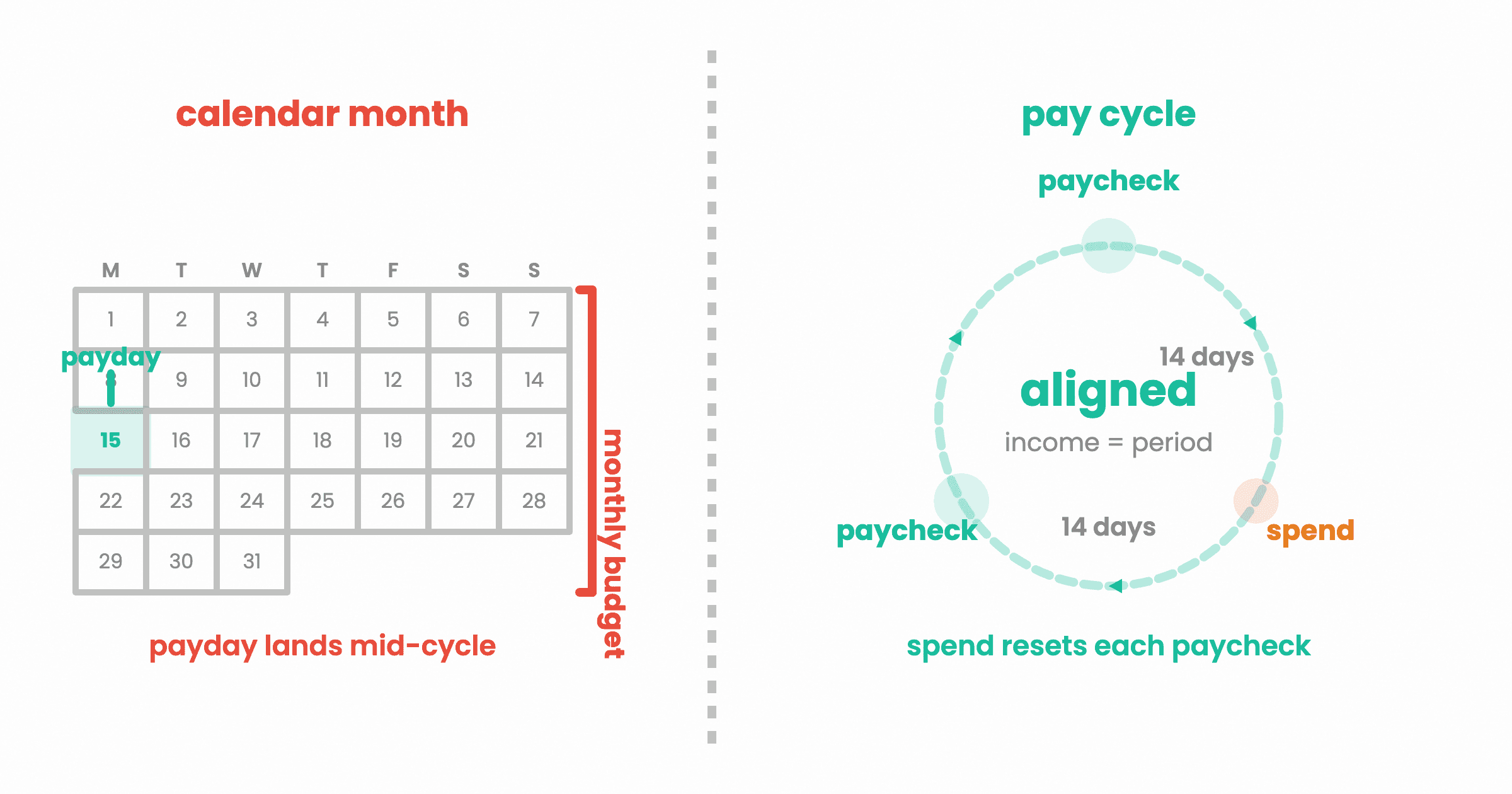
I perfected a budgeting flow in Google Sheets sometime in January 2025. I remember being weirdly proud of it. Every column made sense. It mapped to my fortnightly pay. When money arrived, I knew exactly where it should go.
Then I looked at the budgeting apps available and realised none of them worked that way. They all assumed I wanted to budget by calendar month. Plan from the 1st to the 31st, reset, repeat.
But I don't get paid on the 1st. I get paid fortnightly. And in Australia, that's pretty standard. So every budgeting app I tried was asking me to translate my money into a timeline that didn't match when the money actually showed up.
That mismatch is why a lot of people feel like budgeting doesn't work. It's not the budgeting. It's the timing.
Why Monthly Budgets Break Down
Monthly budgeting makes one assumption: your financial life runs in calendar months. And on the surface, that seems fine. Rent is monthly. Subscriptions are monthly. Utility bills are monthly.
But your income probably isn't.
If you're paid fortnightly, you have 26 pay periods a year, not 12. If you're paid weekly, you have 52. And if you're on irregular income (freelance, contract, commission), you don't have predictable periods at all.
Here's where it gets messy. Say you're paid fortnightly and your pay lands on the 15th. Your budgeting app resets on the 1st. For the first two weeks of every month, you're spending from your last paycheck while the app thinks you're in a fresh budget period. The numbers don't line up. You feel like you're overspending even when you're not, because the budget is counting from a date your bank account doesn't care about.
And then there's the 3-week wall. If you've tried budgeting before and quit somewhere around week 2 or 3, this timing mismatch is part of why. The budget stops feeling accurate because it IS inaccurate. You're measuring spending against a period that doesn't match when money arrives. By week 3, the disconnect is big enough that the whole thing feels pointless.
Two months a year, fortnightly earners get three paychecks instead of two. Monthly budgets don't know what to do with that. Is it a surplus? Do you redistribute? Most apps just ignore it. Pay-cycle budgeting handles it automatically because every cycle is its own unit, regardless of how many land in a given month.
What Pay-Cycle Budgeting Actually Is
The concept is straightforward: your budget resets when your money arrives, not when the calendar says so.
Each time you get paid, you take that paycheck and assign every dollar to what needs to happen before your next paycheck. Bills due in this window. Groceries for these two weeks. The portion of rent that's accumulating toward the due date. Savings transfers. Debt payments. Everything gets allocated from real money you actually have right now.
Then you track spending against those targets until your next pay arrives, and the cycle starts over.
That's it. No projecting what you'll earn over 30 days. No splitting annual expenses into monthly slices and hoping the math works out. Just: money came in, here's where it goes, here's how long it needs to last.
How to Set Up a Pay-Cycle Budget (Step by Step)
Step 1: Know Your Pay Frequency
This determines how many budget cycles you have per year and how long each one lasts.
| Frequency | Cycles/Year | Typical Cycle Length |
|---|---|---|
| Weekly | 52 | 7 days |
| Fortnightly | 26 | 14 days |
| Twice-monthly (1st and 15th) | 24 | 15-16 days |
| Monthly | 12 | 28-31 days |
| Irregular | Varies | Varies |
If you're paid fortnightly, your cycle is 14 days. Not "half a month." Fourteen days. That matters because months aren't all the same length, but your pay cycle is.
Step 2: List Everything That Needs to Happen Each Cycle
Go through your expenses and sort them into two categories:
Every-cycle expenses (things you spend on within each pay period):
- Groceries
- Transport
- Fuel
- Discretionary spending (eating out, coffee, entertainment)
Accumulating expenses (things billed monthly or less frequently that you save toward each cycle):
- Rent or mortgage (if monthly, divide by your cycles per month)
- Utilities
- Insurance (divide the annual or quarterly cost across cycles)
- Subscriptions
- Phone bill
For example, if rent is $2,000/month and you're paid fortnightly, each cycle sets aside $1,000 for rent. When rent is due, the money is already there. No scrambling.
Quarterly insurance is $600? That's roughly $92 per fortnightly cycle ($600 / 6.5 cycles per quarter). Set it aside each payday, and when the bill hits, you're ready.
Step 3: Assign Every Dollar
When your pay lands, allocate it:
- Fixed obligations first. Rent accumulation, bills due this cycle, minimum debt payments. These are non-negotiable.
- Financial priorities second. Emergency fund contribution, extra debt payment, savings goal transfer. This is where the Leak Ladder comes in. Your leaks tell you which financial priority gets money this cycle.
- Living expenses third. Groceries, transport, the stuff you need to function.
- Discretionary last. Whatever's left after the above.
The goal: every dollar from this paycheck has a job before you spend any of it. Not zero in your bank account. Zero dollars without a purpose.
Step 4: Track Spending Against This Cycle's Targets
This is where most budgets fall apart, not because people don't want to track, but because the tracking is tedious.
I tracked every transaction for 5+ years in Bluecoins. I can tell you from experience: the tracking itself is a habit. Once you build it, you barely think about it. But the first few weeks are the hardest, and if the tool makes it feel like homework, you'll quit. My cousin tried three times. Spreadsheets, apps. Never lasted past 3 weeks.
The trick is making the input fast enough that you don't negotiate with yourself about whether to bother. Five seconds or less. Log it when it happens, not at the end of the week when you've forgotten half of it.
Step 5: Review at the End of Each Cycle
Before your next pay lands, look at how you went. Did you stay within your targets? Did anything surprise you? Were there categories you consistently overspent?
This review doesn't need to be a formal sit-down. A 2-minute glance at the numbers is enough. The point is to close the loop before the next cycle starts, so adjustments happen in real time rather than at the end of the month when it's too late to change anything.
Common Pay Frequencies and How They Work
Weekly Pay
52 cycles a year. The shortest feedback loop. You see the results of your spending decisions every 7 days, which means you catch problems early. The downside: more cycles means more setup if you're doing it manually. Automation helps a lot here.
Monthly bills get split across 4-5 weekly cycles. For a $2,000 rent, that's $500 per week set aside (roughly $460 if you calculate against 52 weeks: $2,000 x 12 / 52 = $461.54).
Fortnightly Pay
26 cycles a year. The most common pay frequency in Australia and increasingly common elsewhere. Two months a year you get three paychecks. Monthly budgets don't handle this well. Pay-cycle budgets don't even notice.
This is how I budget. Every 14 days, money arrives, I assign it, and I track against that cycle's targets. When I built that Google Sheets system in January 2025, this is the rhythm it followed. Monthly never made sense to me because it didn't match when the money showed up.
Monthly Pay
12 cycles a year. If this is you, monthly budgeting and pay-cycle budgeting are basically the same thing. Your money arrives once a month, your budget runs once a month, everything aligns. You might still benefit from pay-cycle thinking (assigning every dollar when it arrives rather than letting it sit unallocated), but the timing mismatch isn't your problem.
Irregular Income
This is the hardest one. Freelancers, contractors, commission-based earners, seasonal workers. Your income varies in both timing and amount.
The principle still holds: budget the money you have, not the money you expect. When income arrives, assign it. The difference is that your "cycle" is defined by when payments land rather than a fixed schedule.
Practical approach: budget your minimum expected monthly income, spread across however you want to chunk it. When a larger payment comes in, allocate the surplus to your financial priorities (emergency fund, debt, savings goals). Don't budget the surplus into regular spending, because next month it might not be there.
What Happens When Bills Don't Align
This is the question everyone asks. "I get paid fortnightly, but my rent is due on the 1st. How does that work?"
You accumulate. Each pay cycle, you set aside the portion of that bill that this cycle is responsible for. By the time the bill is due, the money is sitting there.
Here's a real example. Say you earn $3,200 fortnightly and your monthly bills look like this:
| Bill | Monthly Cost | Per Cycle (fortnightly) |
|---|---|---|
| Rent | $2,000 | $1,000 |
| Electricity | $180 | $90 |
| Internet | $80 | $40 |
| Phone | $60 | $30 |
| Insurance (quarterly $450) | $150/mo equivalent | $75 |
| Total fixed | $2,470 | $1,235 |
That leaves $1,965 per cycle for groceries, transport, debt payments, savings, and discretionary spending. You know exactly what's available because you're not guessing how much of last month's pay is already spoken for.
And for those two bonus pay periods per year (the 3-paycheck fortnights), the fixed-bill accumulation is already handled. The extra cycle is just extra. You can direct it entirely to financial priorities without disrupting your regular rhythm.
How Pay-Cycle Budgeting Connects to the Leak Ladder
The Leak Ladder tells you what to fix in your financial setup. 9 leaks, priority order, one at a time. But knowing what to fix is only half of it. The other half is actually doing something about it, consistently, cycle after cycle.
Pay-cycle budgeting is how the Leak Ladder executes.
Each pay cycle, the system looks at your active leaks and generates tasks. If your top leak is "No Starter Emergency Fund," the task might be: transfer $150 to savings this cycle. If it's "High-Interest Debt," the task is: pay $300 extra toward your credit card this cycle. The budget is the vehicle. The leaks are the destination.
This is why monthly budgets and the Leak Ladder don't pair well. If you're reviewing once a month, you get 12 chances a year to make progress on your leaks. If you're on a fortnightly cycle, you get 26. Weekly, you get 52. More cycles means more frequent action, faster feedback, and quicker progress through the ladder.
How YourDigits Handles This
I built YourDigits around pay cycles from day one. Not as a workaround on top of monthly budgeting. The pay cycle is the fundamental unit.
You tell the app how you're paid (weekly, fortnightly, twice-monthly, or monthly), and everything aligns to that schedule. Budget targets, spending pace tracking, leak-plugging tasks, cycle recaps. All calibrated to the time between now and your next paycheck.
A few things that happen automatically:
Targets adapt. If you had a rough cycle and only hit 50% of your targets, the system doesn't keep the same targets next cycle and make you feel worse. It adjusts them down so you can rebuild momentum. Hit 90%+ consistently and the targets gradually increase. The system meets you where you are, not where it thinks you should be.
Tasks generate per cycle. Based on your Leak Ladder position, the system creates specific tasks each time you get paid. Not a vague "save more." A specific dollar amount toward a specific leak, calibrated to what you can actually afford this cycle.
Spending pace tracks in real time. Halfway through your cycle, you can see whether you're on track, ahead, or behind for each category. Not at the end of the month when it's too late. Right now, while you can still adjust.
Three-paycheck months just work. The system doesn't care how many cycles fall in a given month. Each cycle is its own unit. Two cycles in March, three in April. Doesn't matter.
Most budgeting apps default to monthly. Some can be configured for different periods, but it's a workaround. YNAB, Monarch, EveryDollar, Copilot. They're all built on a monthly calendar. If your money doesn't arrive monthly, you're the one doing the translation.
Start With Your Leaks
Pay-cycle budgeting is the how. The Leak Ladder is the what. Together, they turn "I should probably get better with money" into a specific plan that runs on your actual pay schedule.
If you want to know which leaks you have and what to fix first, the Know Your Digits quiz takes about 3 minutes. 11 questions, a financial health score (0-100), and a prioritised list of what to work on. From there, the pay-cycle system tells you exactly how much to put where, every time you get paid.
Go Deeper
- The Leak Ladder: The Complete Guide - The 9 rungs and how they work
- Pay-Cycle Budgeting vs Monthly Budgeting - Side-by-side comparison
- Why Budgeting Apps Fail (And What Should Replace Them) - The 3-week wall
- You Don't Have a Savings Problem. You Have a Leak. - What leaks are and why they matter
- Best Pay-Cycle Budgeting App - How apps handle pay-cycle budgeting

Joy Casfhir
Accountant turned app builder. Tracked 4,600+ transactions by hand over 5 years. Had all the data but no system for knowing what to fix first. That experience became the Leak Ladder: your money has leaks you can't see, and there's an order to fixing them. Built YourDigits to find those leaks and tell you what to fix first.
@casfhirCurious which leaks you have?
The Know Your Digits quiz takes 3 minutes and shows you which of the 9 leaks are yours, in priority order.
Find my leaks